eBay dropshipping. Drafts and orders, in Qublo.
Your eBay store, organised in one dashboard. Import products, prepare listings and manage orders with ease. Your eBay store, organised in one dashboard.
- From Amazon to your drafts in a few clicks
- Choose your profit, Qublo calculates the price
- Keep prices and availability in view
- Orders and messages in one dashboard
- Publish now or schedule your listings
Import products, prepare listings and manage orders with ease.
Your experience with Qublo matters.
Visit Qublo’s profile and share your experience.
The Qublo Home.
Your store, at a glance.
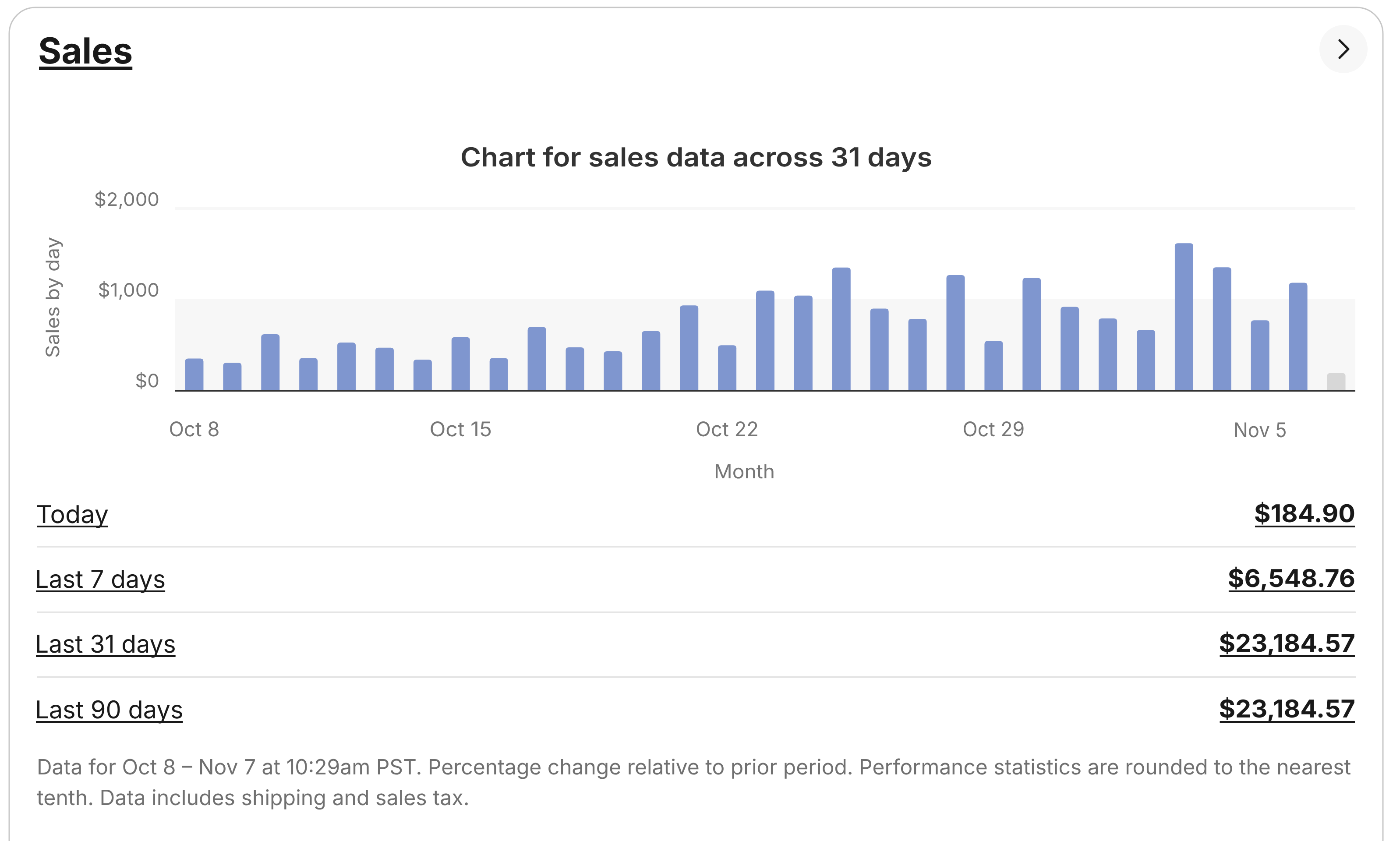
Your store’s key information: sales, profit, products and orders.
Sales and profit
Compare revenue and profit in your sales chart.
Products and orders
Your managed products and an order summary, including ongoing orders.
Store notifications
The bell alerts you to new eBay orders and messages.
From product to sale, in five steps
Import, set the price, review, publish and manage your sales.
1Import your supplier’s products
Paste codes or links, or upload a CSV. Qublo prepares the drafts and explains why any products were skipped. Importing continues even if you close the page.
Qublo and other software
The software matters.
So do the people behind it.
The Qublo team helps every customer set up and use the platform. You can discuss your settings, ask questions and keep track of your requests in the Support area. Choosing software also means knowing who you will be working with.
| When choosing software | With Qublo |
|---|---|
| Getting your settings right | Help with configuring your account and connected eBay stores. |
| Using the tools day to day | Support to find your way around importing, drafts and dashboard settings. |
| Knowing who to contact | Reach us through tickets in your account, email or WhatsApp. |
| Finding instructions | The documentation covers the steps to configure and use Qublo. |
More eBay stores.
One place to manage them.
Drafts, products, orders and messages from your eBay stores, in the same account.
Switch between stores while keeping the settings for each one separate.
The number of stores you can connect depends on your plan.

 Qublo

Your listings, at the time you choose.
Prepare your drafts, complete any missing details and choose a day and time to publish them on eBay. You stay in control: check publication progress and results in your dashboard.

Schedule publication
3 drafts selected
- Day
- 12 November 2026
- Time
- 16:30
After publication, check the result in your dashboard.
Three plans.
Every feature included.
Choose how many products to publish and how many eBay stores to connect.
Advanced 1.4K
€127/month
1,400 published products
- 1 eBay store
- All Qublo features
Enterprise 10K
Recommended€297/month
10,000 published products
- 2 eBay stores
- All Qublo features
Enterprise 30K
€397/month
30,000 published products
- Unlimited eBay stores
- All Qublo features
Qublo, in everyday work
Illustrative reviews
I usually start with Drafts because I want to review the photos, title and price before a product goes live. If a detail is missing, I can finish it there and keep the preparation in one place. Being able to work on several drafts together is useful, and I still decide which products to publish now and which ones to leave for later.
Pricing rules are the feature I use most. I set a target profit for each cost range, then review the breakdown with eBay fees and my configured VAT. The price calculation is there when I need it, before I publish.
When I manage the catalogue, I want product prices and availability to stay connected to the supplier. Qublo updates listings according to my settings, and I can pause monitoring when I need to. I can keep an eye on the products from the dashboard, with the information together instead of scattered across different tasks.
I use Extract while browsing Amazon, review the list and send it to Qublo with Import. Research and publishing stay separate: everything arrives in Drafts, where I can check the details before listing on eBay.
Orders and messages in one dashboard make the sales side easier to follow. I can check the order status and, when the conversation is linked, see the context while replying to the buyer. Moving from an order to a reply feels simpler, because I don’t have to put the whole story together again every time.
If I have a question about a draft or a setting, I prefer to show the issue properly. I can attach useful screenshots to a support ticket and find the conversation again in Support. The request stays with its details, ready to pick up where I left off.

More control, from product to sale.
Prepare listings, monitor products and manage sales from a single dashboard.
- Product imports and draft preparation
- Pricing rules with your target profit
- Price and availability monitoring
- Orders and messages from connected stores
Frequently asked questions
Useful answers to help you get started and understand how Qublo works.
What is Qublo?
Qublo is software for managing eBay dropshipping from one dashboard. It helps you import products from Amazon, prepare listings, monitor prices and availability, and manage orders and buyer messages across your connected eBay stores.
Explore the featuresHow do I get started with Qublo?
Create your account, choose a plan and connect your eBay store. Set your pricing rules and selling policies, then import your first products and check the drafts. You decide which listings to publish and when to publish them.
Read the setup guideWho is Qublo for?
Qublo is designed for eBay sellers who want to organise their work with Amazon products. You can use it to prepare your first listings or manage a larger catalogue and multiple stores, within the limits of your chosen plan.
See how it worksWhich products can I import, and how?
You can import Amazon products using ASIN codes, product links or a CSV file. The Qublo extension also lets you collect products while browsing Amazon. Imports become drafts, so you can check their details before publishing them on eBay.
Read the import guideWhich eBay markets does Qublo support?
Qublo supports eBay in Italy, Germany, the United States and Australia. When importing from Amazon, select an eBay store in the same country. The dashboard lets you distinguish your connected stores by market and work with the right destination.
Read the markets guideHow much does Qublo cost?
Monthly software plans start at €127 per month. The pricing page shows the three available capacities and the 3-, 6- and 12-month packages, with their prices, included product limits and number of eBay stores, so you can compare the options.
Compare pricesWhat is the difference between monthly plans?
All three monthly plans include the same features. Published product limits and eBay store allowances differ: Advanced 1.4K includes 1,400 products and one store; Enterprise 10K includes 10,000 products and two stores; Enterprise 30K includes 30,000 products and unlimited stores.
Compare monthly plansHow is the selling price calculated?
You set your target profit, and Qublo calculates the selling price using the product cost, eBay fees and your configured VAT rate. You can define rules for different cost ranges and review the calculation before publishing a listing.
Read the pricing rules guideHow do I connect my eBay account?
Start the connection from Qublo settings to open eBay’s official sign-in and authorisation page. Sign in there and authorise Qublo through OAuth. When you return to the dashboard, complete your store setup and check its market, pricing and selling policies.
Read the eBay connection guideHow can I contact support?
If you are already a customer, open a ticket from Support in your Qublo dashboard and include the details of the issue and any useful attachments. For enquiries, email support.qublo@gmail.com or use WhatsApp from the website’s contact page.
Contact the Qublo teamHave another question? Contact us