Publishing on eBay
Prepare now. Choose when publishing starts.
Keep your drafts ready and set a date and time to start publishing. Preparing a listing and submitting it can happen at different moments.
See the complete guide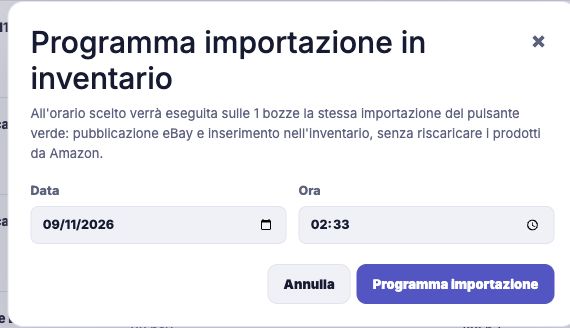
Organise the work around your schedule
You do not have to finish preparing your products and publish them all at once. From Drafts, choose the products you have reviewed and schedule their submission for a specific day and time. The request summary helps you check both the selection and the appointment. After processing, review the outcome to see which products actually reached your inventory.
- Schedule publication for a selection of drafts.
- Set the start date and time together.
- Check the registered request and its eventual outcome.
How to get started
Prepare the selection
In Drafts, review content, pricing and warnings. Select the products that are ready and choose Schedule Publication.
Set the appointment
Choose the day and time in the inventory import scheduling form. Its time reference is the Rome time zone.
Confirm and review
Confirm Schedule import and check the registered request. After processing, review the result in Products.
Find every step in the documentation
Screens, instructions and practical checks for this feature.